OVERVIEW OF PROCESS:
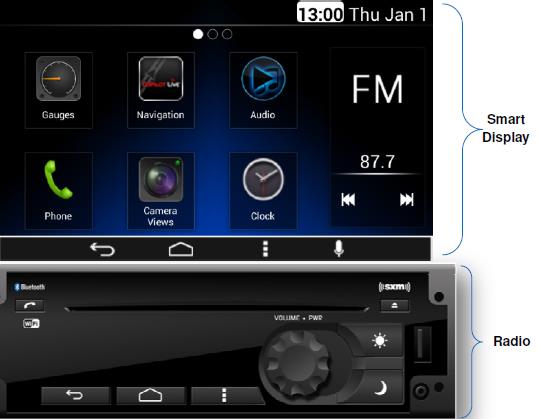
• STEP 1: Find your NavPlus display model number
• STEP 2: Download the software update file
• STEP 3: Select and download the correct file to a USB Key
• STEP 4: Insert the USB Key into the front port of the radio and wait up to seven minutes for the update to start
• STEP 5: Wait a few minutes for the update to install
• STEP 6: Once complete the Radio software will be updated
• STEP 7: Verify the update was successful
STEP 1: Find your display model number
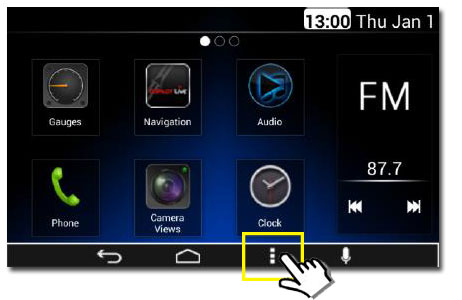
• Select the three vertical dots
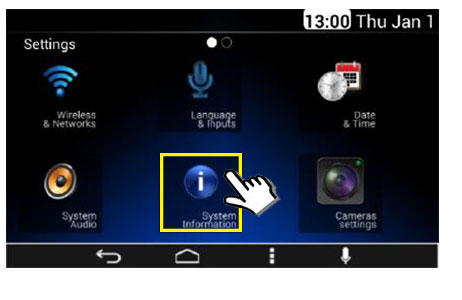
• Select the System Information icon
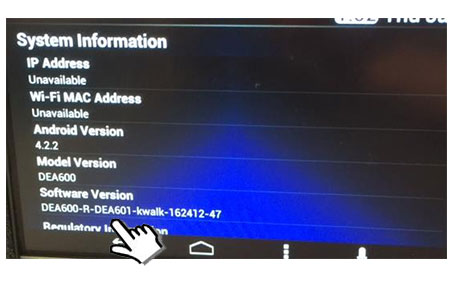
• If DEA601 is listed anywhere under Software Version, then the unit is a DEA601, otherwise it is a DEA600, regardless of the Model Version number. It is VERY IMPORTANT that you use the correct download for these systems.
STEP 2: Download the software update file
- DEA601 | Model Year 2021 or newer (New Graphic, will lose DPF & Fuel Economy Gauges)
- DEA601 | Before Model Year 2021
- DEA600 | Model Year 2021 or newer (New Graphic, will lose DPF & Fuel Economy Gauges)
- DEA600 | Before Model Year 2021
STEP 3: Installation
Once you have downloaded the required files, please visit Kenworth site for installation instructions: